AI Reverse Video Search: The New Way to Find Videos in 2026
How AI is changing reverse video search — from deep learning frame analysis and facial recognition to multimodal models that understand video content. Compare AI-powered tools, learn what they can (and cannot) do, and see how they beat traditional reverse search.
You just found a viral video — no watermark, no description, no credits. You need to know where it came from, who is in it, and whether it has been edited. So you take a screenshot, upload it to Google Images, and get back… nothing.
If that scenario sounds familiar, you already know the hard ceiling of traditional reverse video search. It matches pixels. And the moment a video gets cropped, re-encoded, color-graded, or dropped into a compilation, those pixels no longer match anything.
That is why AI reverse video search is not just a faster version of the old method — it is a fundamentally different capability. Instead of matching pixels, AI builds a semantic understanding of the video: who appears, what objects are visible, what is being said, what scene is unfolding. Then it searches across all of those dimensions at once. A cropped, filtered, re-encoded compilation still gets found, because AI recognizes the content, not the pixels.
By the end of this guide, you will know exactly how AI reverse video search works under the hood, which tools deliver in 2026, where the technology still falls short, and — most importantly — which tool to reach for depending on what you are trying to find.
Full disclosure: we built reversevideosearch.org, and the explanations and comparisons below are based on hands-on testing across multiple AI search tools — not vendor specs or marketing pages.

How AI Reverse Video Search Works
Traditional search matches images pixel by pixel. AI search creates a semantic understanding of the video and matches against other content that shares the same semantic fingerprint.
Think of it like translation versus copying: traditional search copies a sentence and finds the exact same text elsewhere; AI search understands the meaning and finds the same idea expressed in different words, different contexts, different formats.
Here is what happens when you run a video through an AI-powered reverse search:
1. Frame-Level Visual Embedding
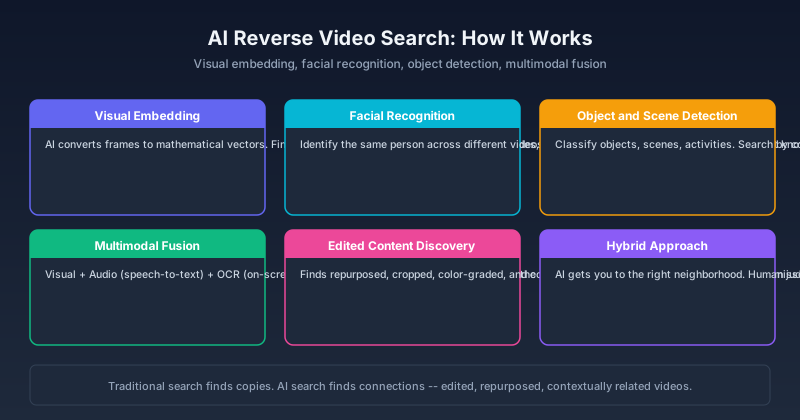
The AI converts each frame into a mathematical representation — a vector that encodes what is in the image, not just how it looks. Two frames that show the same person from slightly different angles will have similar vectors, even if the pixels do not match.
This means the search works even when the video has been:
- Cropped or resized
- Compressed or re-encoded
- Color-graded or filtered
- Placed in a compilation or collage
- Screenshotted and re-uploaded
The takeaway: if a human can still recognize the content, AI visual embedding has a good chance of finding it — regardless of surface-level changes.
2. Facial Recognition and Character Tracking
AI models trained on face recognition can identify the same person across different videos, lighting conditions, and angles. This enables searching for all appearances of a specific person — even if each video is visually quite different.
What this enables: Finding every video where a specific person appears, across platforms and upload dates — without knowing any video title or description.
3. Object and Scene Detection
The AI classifies objects, scenes, and activities in the video. A search for protest footage with a specific landmark in the background becomes possible — even if no one tagged the video with those keywords.
4. Multimodal Analysis (Text + Audio + Visual)
The most advanced AI search tools process everything simultaneously:
- Visual: Who and what is in the frame
- Audio: What is being said (speech-to-text), what sounds are present
- Text: On-screen captions, watermarks, news chyrons (OCR)
- Context: The likely event, location, and time based on all of the above
This multimodal approach is what separates AI reverse video search from traditional frame matching. A frame match tells you "this image appears on this page." An AI match tells you "this video is about this event, features this person, was likely recorded at this location, and matches these other videos of the same event."
Why 2026 Is Different
Two shifts in the last 18 months make this guide more relevant than it would have been in 2024. First, multimodal AI models that process video, audio, and text jointly have moved from research papers to production APIs — what was experimental is now accessible. Second, AI-generated video has flooded the internet, making origin verification dramatically more important. The same technology that powers AI search also powers AI-generated content; understanding how to trace video origins is no longer optional for journalists, fact-checkers, and content moderators.
AI Reverse Video Search Tools Compared
With the technical foundation in place, the next question is which tools actually deliver that capability today.
Dedicated AI Reverse Search Engines
| Tool | AI Capabilities | Best For |
|---|---|---|
| reversevideosearch.org | Multimodal AI search, cross-platform | General-purpose reverse video search |
| Google Deep Image Search | Visual embeddings, object detection | Finding visually similar content |
| TinEye MatchEngine | AI-powered visual matching | Tracking image and video frame usage |
| Azure AI Video Indexer | Full multimodal — faces, objects, speech, text, sentiment | Enterprise video analysis |
AI Models That Enable Reverse Search
The underlying AI technology powering these tools:
- CLIP (OpenAI): Connects images and text — enables searching video frames by describing what you see
- DINOv2 (Meta): Self-supervised visual features — excellent at finding the same object across different contexts
- Whisper (OpenAI): Speech-to-text — converts spoken content into searchable text
- YOLO / Detectron: Real-time object detection — identifies specific objects within frames
What Each Approach Finds
| Search Method | Finds Exact Copies | Finds Edited Versions | Finds Same Person | Finds Same Event |
|---|---|---|---|---|
| Traditional frame match | ✅ Yes | ❌ No | ❌ No | ❌ No |
| AI visual embedding | ✅ Yes | ✅ Yes | ⚠️ Sometimes | ⚠️ Sometimes |
| AI facial recognition | N/A | N/A | ✅ Yes | ❌ No |
| AI multimodal | ✅ Yes | ✅ Yes | ✅ Yes | ✅ Yes |
The takeaway: Traditional search finds copies. AI search finds connections. For tracing a video's origin, verifying authenticity, or finding related content, AI-powered search is categorically more powerful.
When AI Reverse Video Search Excels
Finding Heavily Edited or Repurposed Videos
A video gets cropped into a vertical format, color-graded for a different platform, and reposted with new text overlays. Traditional frame matching fails — no pixel matches the original. AI visual embeddings recognize the underlying content despite the surface changes.
Tracing a Person Across the Internet
Someone appears in multiple videos across different platforms, different dates, different contexts. AI facial recognition can find all appearances, even when the person is not tagged or named in any of them.
Verifying Event Footage
Multiple people filmed the same event from different angles. AI scene and object detection can cluster all videos of the same event — even if they look completely different visually — because they share the same detected objects, activities, and context.
Finding the Origin of a Meme or Trend
A video format goes viral — hundreds of people recreate it. AI search can trace back to the earliest instance by analyzing content patterns and upload chronology, even when each recreation is visually unique.
Limitations and How to Work Around Them
AI search is powerful but not magic. Here is what it still struggles with — and what you can do about it.
Privacy and Ethical Boundaries
Facial recognition on public videos is technically possible — which is why responsible tools implement guardrails. The best AI reverse search tools focus on publicly indexed content and avoid building identifiable person databases without consent frameworks.
What this means for you: Verify that any AI search tool you use publishes its privacy policy and data retention practices. Tools that offer anonymous matching — matching against a public index without storing your upload — are preferable for sensitive content.
Computational Cost
AI analysis of video is computationally expensive — orders of magnitude more than image matching. AI reverse search tools are typically slower (seconds to minutes vs milliseconds) and may have usage limits on free tiers.
What this means for you: For a quick first pass, start with a keyframe screenshot and traditional image search (milliseconds). Only escalate to full AI video analysis when the frame match fails. This saves both time and API quota.
Accuracy Is Probabilistic, Not Deterministic
Traditional frame matching gives binary results: match or no match. AI search gives confidence scores — "72% likely this is the same event." This is powerful but requires human judgment to interpret.
What this means for you: Treat AI matches as leads, not evidence. Always cross-reference high-confidence matches with at least one additional signal — upload date, channel history, or metadata.
New or Obscure Content
AI models are trained on existing data. If a video features a person, object, or scene type the model has rarely encountered, detection accuracy drops.
How to Use AI Reverse Video Search Today
Before diving into the full workflow, here is a 30-second sanity check: upload a short clip to your chosen tool and check whether the preview analysis correctly identifies at least one major element — a face, an object, or a text overlay. If the basic preview fails, the search results will not improve either. Try a different tool or a higher quality source file. This quick test saves you from waiting minutes for a search that was doomed from the start.
Step 1: Choose the Right Tool for Your Goal
| Your Goal | Best Tool Type |
|---|---|
| Find where a specific video came from | Multimodal AI search (reversevideosearch.org) |
| Find all appearances of a person | AI facial recognition tool |
| Verify if a video shows a real event | AI + traditional cross-reference |
| Find similar videos to one you have | AI visual embedding search |
Step 2: Upload or Link the Video
Most AI tools accept video uploads or URLs. Provide the highest quality version you have — compression artifacts reduce AI analysis accuracy significantly. A 240p source that fails a search may simply mean the AI could not read the content, not that the content does not exist.
Step 3: Review AI-Analyzed Results
AI search returns results with confidence scores and analysis metadata:
- High confidence (>85%): Likely a genuine match — verify by checking the source
- Medium confidence (50–85%): Worth investigating — could be a related video or a partial match
- Low confidence (<50%): Probably noise — but occasionally catches unexpected connections
Step 4: Cross-Reference with Traditional Methods
AI search is strongest when combined with traditional methods. Use AI to find candidate matches, then verify with:
- Manual date comparison (earliest upload is usually the original)
- Account analysis (does the uploader consistently post original content?)
- Metadata check (does the video file or page contain creation date info?)
Common Pitfalls When Using AI Reverse Video Search
Over-Trusting Confidence Scores
The most common mistake we see: treating a 75% AI confidence score as "basically confirmed." Confidence scores reflect how well the video matches the AI's training patterns — not ground truth. A video of a common scene type such as a sunset crowd or a generic street can return high-confidence false positives because it matches too many things.
Fix: Never rely on a single high-confidence result. Require at least two independent signals — confidence score plus upload date proximity, matching audio fingerprint, or account analysis — before calling a match confirmed.
Uploading Low-Quality Source Files
AI analysis accuracy drops sharply below 480p resolution and with heavy compression artifacts. A blurry 240p upload that fails to find anything might not mean "no match" — it means the AI could not analyze the content properly.
Fix: If your source is low quality, try finding a better version first through keyword search or platform-native tools. A high-quality source is worth ten low-quality uploads.
The Future of AI Reverse Video Search
Three trends are shaping where this technology goes next:
-
Real-time search. AI models are getting faster. Within 1–2 years, real-time AI reverse video search — upload a video and get results in under 5 seconds — will be standard.
-
Multimodal fusion. Future models will jointly analyze video, audio, and text in a single unified embedding, rather than running separate models and combining results. This will improve accuracy significantly for complex searches.
-
Decentralized indexing. Blockchain-based content attribution systems are emerging. Combined with AI search, these could enable tracing a video's complete repost chain — from original creator through every reshare.
Bottom Line
AI reverse video search does not replace traditional methods — it extends them into territory pixel-matching never could reach.
Rule of Thumb — AI finds the neighborhood; human judgment finds the address. Use AI to surface candidates, then verify manually.
What this means for your next search:
- Need an exact copy match → start with traditional frame matching (faster, cheaper)
- Need to trace an edited or repurposed video → use AI visual embedding or multimodal search
- Need to find every appearance of a person → use AI facial recognition
- Need to verify event authenticity → use AI multimodal search, then cross-reference
Start with one video today. Upload it to reversevideosearch.org, run both the AI analysis and a traditional frame match, and compare what each finds. That ten-minute experiment will teach you more about where each method works — and where it does not — than reading any guide.
For traditional search methods, see our guides on how to do a reverse video search and finding the original source of a video.
FAQ
What is AI reverse video search?
AI reverse video search uses machine learning models — visual embeddings, facial recognition, object detection, speech-to-text — to understand video content semantically and find related videos across the web, rather than matching exact pixels.
Is AI reverse video search better than traditional methods?
For finding edited, repurposed, or contextually related videos, yes — significantly better. For finding exact copies of a specific frame, traditional methods work fine and are faster.
Are there free AI reverse video search tools?
Yes. reversevideosearch.org offers AI-powered search with a free tier. Google Lens uses some AI-powered visual matching and is completely free.
How accurate is AI facial recognition in videos?
Variable. In good conditions — clear face, front-facing, good lighting — accuracy is high, above 90%. In poor conditions — profile angle, low light, motion blur, partial obstruction — accuracy drops significantly.
Does AI reverse video search work on any video?
It works best on videos that contain recognizable content — faces, objects, scenes, text — that have some presence elsewhere online. Very obscure, highly abstract, or brand-new content may not return useful results regardless of the AI method used.
Author

Categories
More Posts
Reverse Video Search Online: 6 Free Ways to Find Any Video Source in 2026
Learn how to do a reverse video search online using free tools, Google, and AI. Step-by-step guide to the best websites for reverse video search with real methods that work.

How to Find the Original Source of a Video with Reverse Video Search (2026 Guide)
A practical guide to finding where a video originally came from. Use reverse video search to trace reposts, identify the earliest upload, and verify the real creator in minutes.

Video Finder: How to Find Any Video Online Using AI Tools
A practical video finder workflow for locating any video online from a clip, screenshot, quote, URL, or file using reverse video search and AI tools.
Newsletter
Join the community
Subscribe to our newsletter for the latest news and updates